Mappings
The Mapping pane allows the user to view and insert fields defined in the data sources as well a hierarchical view of tags within the document. You can access these by clicking Mappings in the ribbon:

Fields tab
Below is a view of the fields returned by an XML data source.
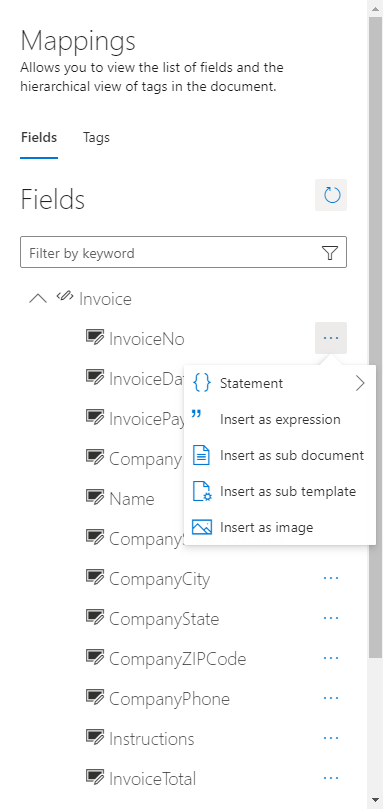
Each defined data source will be listed under the Filter text box. Expanding the data source shows the fields defined in the data sources. Clicking directly on the field name will drop a tag of type "Expression". If another tag type needs to be inserted for a specific field, the user needs to click on the three dots and select the proper tag type. After a tag is inserted from the Mappings pane, changing the field Type to "Code" under its properties will insert the code to get the string representation of the field. This code is contextual to where it is dropped (either within or outside of a loop). The code will only work if the tag is in the proper scope.
Tags tab
Below is a view of the tags already inserted in the template.
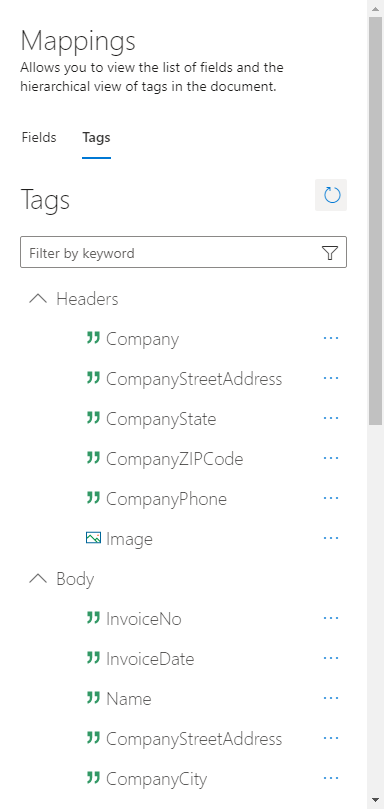
Clicking on the item in the three view selects the tag in the document. A tag can be deleted by clicking on the three dots and selecting Delete.