Microsoft Sharepoint
How to register SharePoint App via PowerShell?
Problem: Microsoft enhanced the security measures within administrative governance by altering the default protocols for SharePoint app registration. Thus, site collection administrators can no longer register or update app permissions unless they receive explicit authorization from the SharePoint tenant administrator.
The error message when 'permissions are not configured before creating a new SharePoint connector' or 'reaching out to a new site. created starting mid-August 2023' was: "Your SharePoint tenant admin doesn't allow site collection admin to create an Azure Access Control (ACC) principal. Please contact your SharePoint tenant administrator." For details on the changes, please refer to SharePoint admin control for App registration updates.
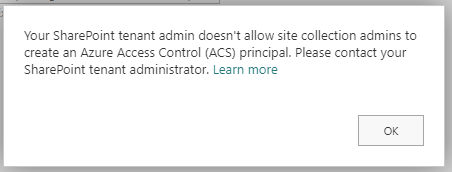
Solution: Follow the steps below:
| 1. | In the Windows system, search SharePoint Online Management Shell. If unavailable, download from the SharePoint Online Management Shell download installer page. |
| 2. | Make sure your current version is updated to 16.0.23710.12000 or a later version. |
| 3. | Open SharePoint Online Management Shell. |
| 4. | Run Connect-SPOService -url https://{yourTenant}-admin.sharepoint.com command. |
You can use this cmdlet to connect to the SharePoint Online service. You need to specify the URL of your SharePoint Online admin center (tenant admin URL) as the parameter to this cmdlet. Replace "https://your-tenant-admin-url" with the actual URL of your SharePoint Online admin center.
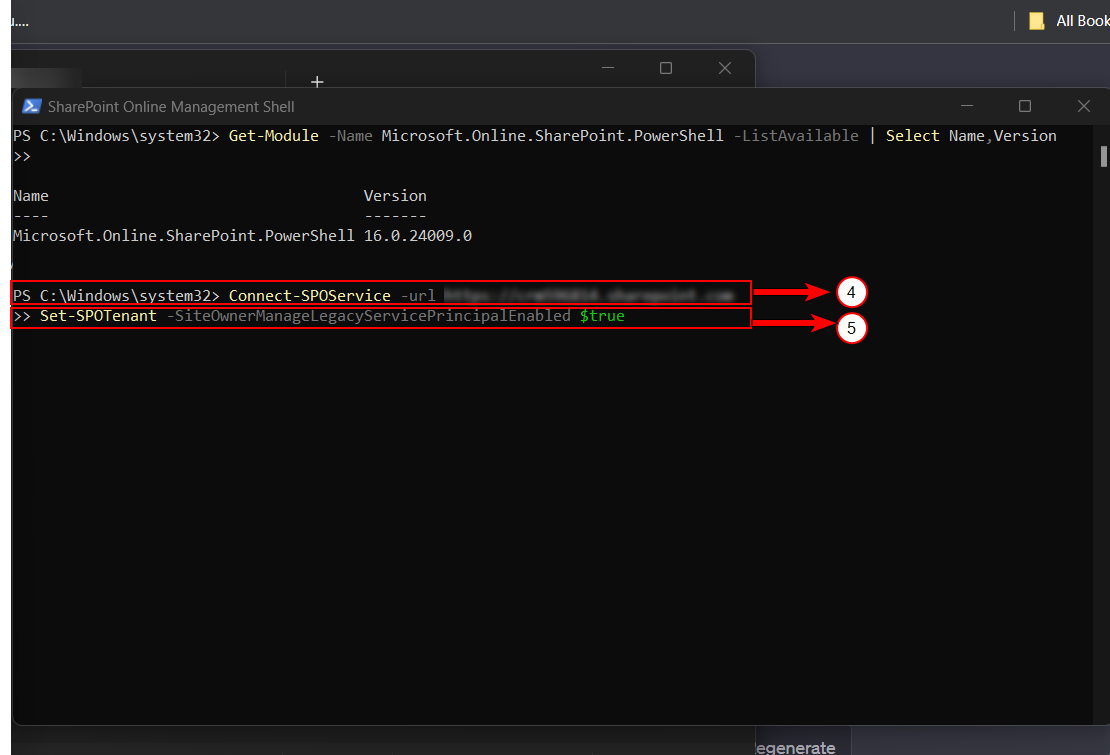
| 5. | Run Set-SPOTenant -SiteOwnerManageLegacyServicePrincipalEnabled $true. |
You can use this cmdlet to configure settings for the SharePoint Online tenant. In this case, set the SiteOwnerManageLegacyServicePrincipalEnabled property to $true, which allows site owners to manage legacy service principals.
Set-SPOTenant -SiteOwnerManageLegacyServicePrincipalEnabled $true| 6. | Complete the authentication to update your Azure Access Control permissions. |